 Get Beim Goods Livestream Chat TTS From Google Chrome Store →
We recently resolved a user-reported issue that occurred during Whatnot Live shows. The problem was that when a mod pinned a message (e.g. made an announcement), it disrupted the TTS, causing chats to be read aloud repeatedly. We investigated the issue and were able to reproduce it and diagnose the cause. Without going into too much detail, the cause is how the Whatnot platform displays normal user chats, pinned chats from hosts/mods, and how our software interprets them. Recent changes on the Whatnot platform also appear to have contributed.
To fix this, we made some changes to our code. In the 1.3.11 update, our Chat TTS now ignores pinned mod messages, so chats are no longer read repeatedly.. Whatnot also has a separate live show dashboard for hosts. In 1.3.12, we fixed the same issues for the host dashboards. Chat TTS is now fully functioning on Whatnot.
Since this incident, we’ve also added in-extension support for users. We added a issue report feature to the ‘Beim Goods TTS’ utility footer bar in update version 1.3.14.
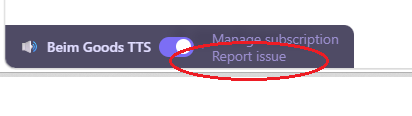
The issue report link points to an intake form, where users can report issues or simply give us feedback at any time. The form does not share user info with us other than the platform/site where the issue occurred, the Chat TTS software version, and user feedback.
We also started a Discord server, where users can leave us comments or feedback. Our discord server gets a near-real-time feed of product updates and blog posts, with the channels organized by supported platforms.
For general questions about our products, visit our FAQ page.
p.s. We skipped Version 1.3.13. because we are a little superstitious.