Do you ever wonder if your computer is passing your data to third party servers? Or, is Web Speech API offline?Today, we will share how to check if your TTS (text to speech) is passing your chat data to third party servers for language synthesis.
In today’s world, we are constantly connected via our phones, laptops, text, social media etc. While connectivity makes our lives easier, and our computer’s TTS’s eloquent voice becomes more comforting to the ears, the TTS speech synthesis can hand the text to third party servers for processing, and privacy could become a concern.
To check if TTS is processed locally, there are two methods.
Method 1. Use the browser's DevTools to check speech synthesis setting
- Windows: F12 (or Fn + F12)
- Mac: Cmd + Option + I
- ChromeOS: Ctrl + Shift + I
In the Console tab, paste this and press Enter:
speechSynthesis.getVoices().find(v => v.default)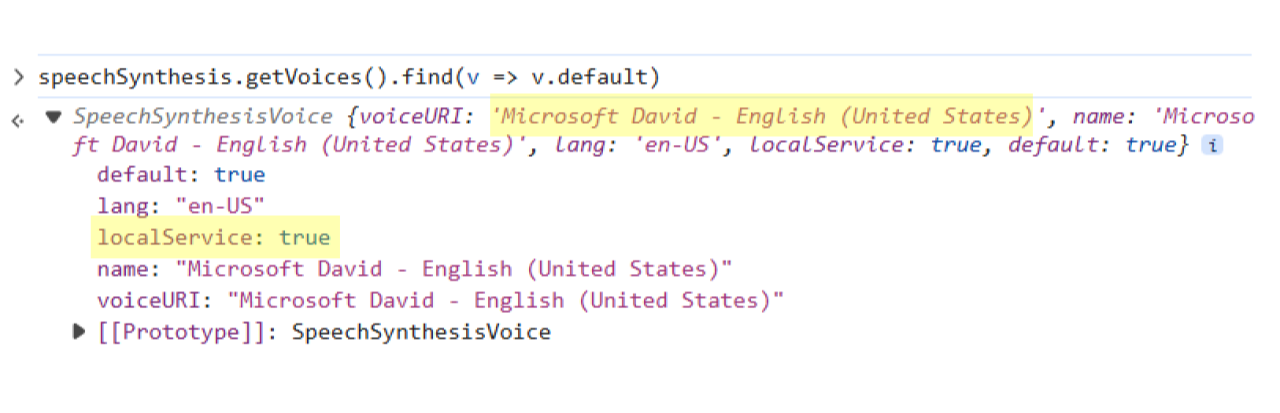
- Note in this screenshot, this example computer’s setting is David, and localService: true.
- This is this example computer’s default voice, and it's local.
Method 2. Use OS’s Speech setting to check browser's speech synthesis setting
- Settings → Time & language → Speech → Voices → pick from the dropdown.
- Speech voices available via the OS could be processed locally, or could be sent to a remote server. Check the word ‘Online’, and users can always use Method 1 to confirm the locality of the speech synthesis function.
If the user’s localService indicates ‘false’, the user can take actions to modify the default speech setting.
To set up Windows TTS voices, see Microsoft's supported languages and voices. For ChromeOS, see Google's text-to-speech settings guide.
What this means for Beim Goods Livestream Chat TTS
Livestream Chat TTS extension reads chat aloud using whichever voice user selected, so the user’s voice choice is the privacy choice. Pick a local voice and the text never leaves the machine. Either way, chat text is never transmitted to Beim Goods servers.
Have more questions? Visit our FAQ, or see our blog for guides on enabling Chat TTS on a specific platform.
 Get Beim Goods Livestream Chat TTS →